
Loading

Use the Driver Express for Adobe® Postscript® 3™ to send a print job

Introduction

Canon provides Driver Express for Adobe® Postscript® 3 that allows you to send print jobs to your printer.

It is a driver for macOS environments and Windows environments and generates PostScript data.

It has less features then Driver Select; for example no preview, not able to determine the configuration of the printer, and no password print.

You need a license to be able to print PostScript files on the printer.
Procedure

  1. Open the file that you want to print in the source application.
  2. From the [File] menu of the application, click [Print].
  3. Select the product name of your printer in the [Printer] area of the [Print] dialog box.
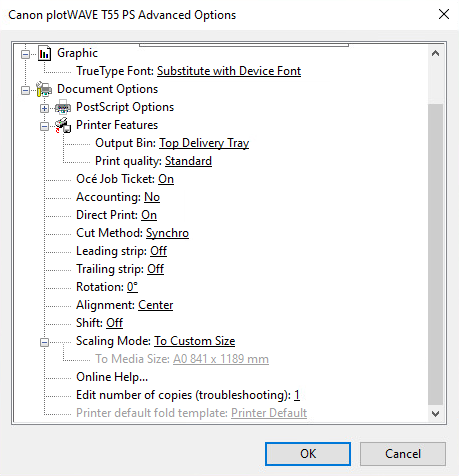
  4. Click [Properties] and [Advanced].

    When you select Properties you can define the settings for your print job.

  5. Activate the Job Ticket to overrule the default values for the job settings.
  6. Check and change the Printer Features settings if necessary.
  7. Click [OK] to send the print job to the Smart Inbox or the print queue.