
Some generic operations are available everywhere inside ADAM. They via be accessed from the top-right part of the screen:
About
Displays the current version as well as the list with third party open source components used, accessible from the
 menu.
menu.
Language selection
[TSM]
Opens the [TSM] that belongs to this product. A precondition is that you have subscribed to the [TSM] in the Robin application and that you have downloaded the latest version. The Porthos page will open in a new tab.
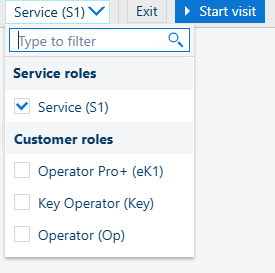
Role selector
[Exit]
[Finish session]
Use the drop-down control to select one or more roles. Data in the ADAM workspace will adapt to display tasks for all the checked roles.
 NOTE
NOTE
Depending on your user's role and the product model. you may see different options.
The visit can be closed in two ways:
Use the [Exit] to close without saving any of the changes.
Use this option to exit ADAM without saving the service visit data. All data which was entered will be lost.
Use the [Finish session] to properly close all the items, and indicate the duration of the visit.
Use this option to exit ADAM and save the service visit data. All mandatory fields need to be filled in.
If you did not cover all the mandatory items (problems, issues, maintenance), then they will be prompted in a new pop-up window.