
When you print on rigid media, a light bar signals when you can input media. To prevent pollution buildup, you must clean this light bar.
Use Colorado XL-series prescribed:
Microflex gloves for handling UVgel
Lint free cloths
Cleaning liquid (IPA)
 CAUTION
Wear gloves when contact with ink or maintenance materials is possible. Gloves should always overlap sleeves. Follow the ink related Safety Data Sheets (SDS) guidelines carefully in order to ensure maximum safety.
 NOTE
NOTE
Make sure the printer is not printing when you perform this maintenance procedure.
|
1 |
Go to the input side of the printer. |
|
|
2 |
Put on the Colorado XL-series approved gloves. |
|
|
3 |
Locate the light bar. Insert your hand into the opening directly behind the lane lights and reach up to find the light bar. |
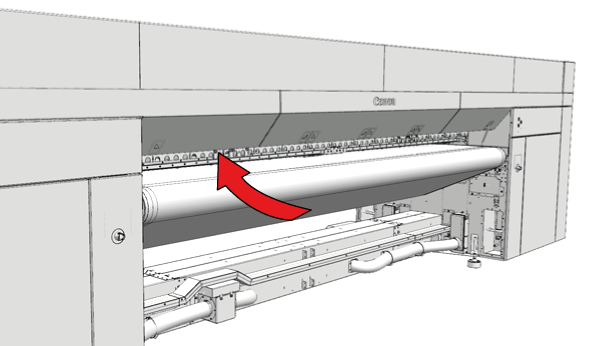
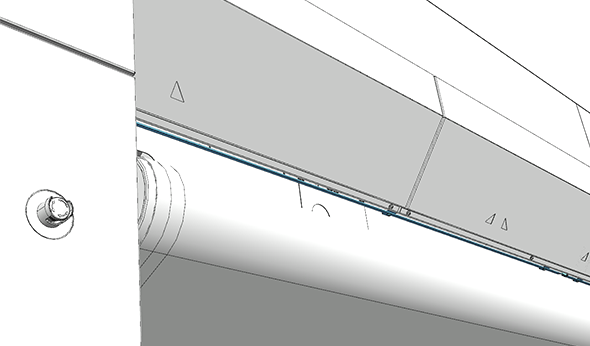
|
|
4 |
Dampen a lint-free cloth with cleaner IPA and clean the light bar. Ensure that the cloth remains damp, and dampen again if necessary. |
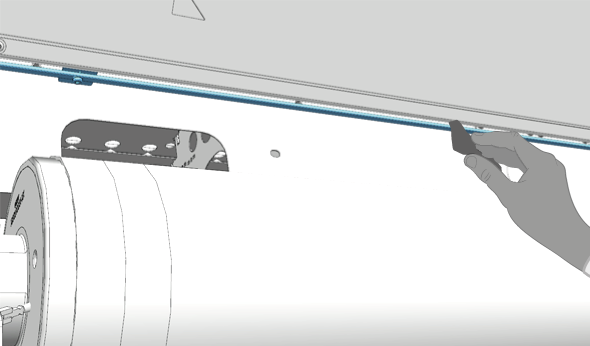
|
|
5 |
Dispose the lint free cloths as chemical waste according to local regulations. |