This documentation describes the changes that have been made in PRISMAprepare Go and the introduction of PRISMAsubmit Go.
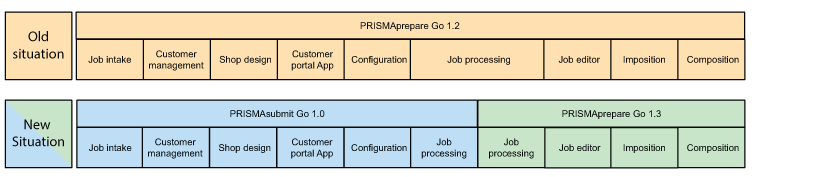
In this version of PRISMAprepare Go we have moved the following functionality to a new product called PRISMAsubmit Go:
Job intake
Customer management
Shop design
Customer portal app
Job processing is available to both applications, with specific tasks carefully divided into two separate yet strongly connected products.
The image below provides a visual representation of the split.
Existing PRISMAprepare Go users with the FREE LIMITED FUNCTIONALITY license.
With the limited functionality license of PRISMAprepare Go, we will automatically activate the PRISMAsubmit Go free but limited functionality license.
Existing PRISMAprepare Go users with the PREMIUM SERVICES of the PRODUCTION functionality license.
If you have the premium services of the production functionality license of PRISMAprepare Go, we will automatically activate the Unlimited and Generic URL license of PRISMAsubmit Go for free.
With this new license you will be able to receive unlimited jobs via [Job intake] and receive the new feature [Generic link] for onboarding unregistered print buyers.
Here are the highlights of PRISMAprepare Go:
The job editor and composing app can be accessed concurrently based on available licenses
2 new accounting fields available for PRISMAsync printers
The new [Send to printer] functionality lets you submit a file to the printer, regardless of subscription availability
Highlights of the first release of PRISMAsubmit Go:
[Generic link] feature allows job submission without a print buyer account
Possibility to add a new job from [Job processing]
The new [Send to printer] functionality lets you submit a file to the printer, regardless of subscription availability
History of new features of PRISMAprepare Go and PRISMAsubmit Go
PRISMAprepare Go 1.2.0:
The composition app
Merge and unmerge for attachments
PRISMAprepare Go 1.1.4:
New functionality: the caption text editor
New application type: the perfect bound book
For the up-to-date documentation: visit https://downloads.cpp.canon, select your product and language, and find all the support information.
|
Documentation |
Available |
|---|---|
|
PDF user guide |
|
|
Online user guide |
|
Scan the following QR code or follow the link to see the available instruction videos.