
There are several demonstrations available in the PRISMA Demo V4.1:
[On-premises workflow applications]
[Cloud workflow applications and tools]
 NOTE
NOTE
The availability of product demonstrations depends on the region.
|
Demonstration |
Description |
|---|---|
|
PRISMAsync |
General demonstration PRISMAsync for imagePRESS V1000 |
|
PRISMAdirect Education |
PRISMAdirect demonstration environment for educational segment. |
|
PRISMAdirect Commercial B2B |
Demonstration environment for commercial B2B segment. |
|
PRISMAprepare |
Demonstration environment for PRISMAprepare |
|
Demonstration |
Description |
|---|---|
|
PRISMA Home |
Demonstration environment for PRISMA Home |
|
PRISMAlytics Accounting |
Demonstration environment for PRISMAlytics Accounting |
|
PRISMAlytics Dashboard |
Demonstration environment to a fact-based, real-time performance dashboard that helps print floor managers to optimize the print workflow of their PRISMAsync production printers. |
|
PRISMAprepare Go |
Demonstration environment for PRISMAprepare Go |
For the Cloud applications the start function is available, for the other demonstrations the next three functions are available:

|
Function |
Description |
|---|---|
|
[Start] |
Start a demonstration immediately. The Cloud applications start always immediately. The time to start other demonstrations varies between; instantly, 15 minutes or up to 1 hour, depending on the product and on whether un-assigned demonstrations are available or not. When you move the mouse pointer over the [Start] function, a pop-up is displayed with information about the time to start the demonstration. Examples: 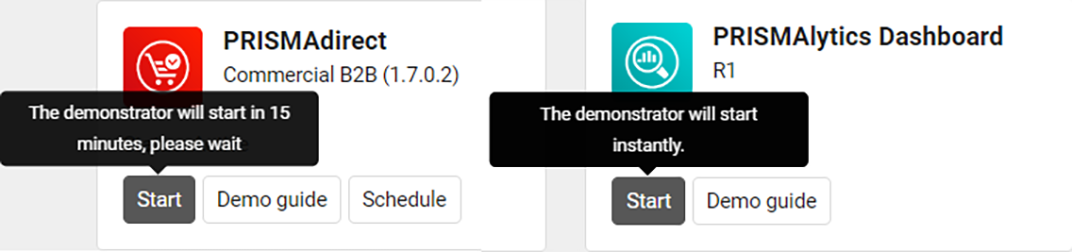
Use this function if you need to run an ad-hoc demonstration. NOTE
The advantage is that you can always start a demonstration if it was not planned/ scheduled in advance. The downside is that the time to start a demonstration is dependent on the availability of unassigned demonstrations. If there are several users who want to start an ad-hoc demonstration at the same time, it may take a very long time to start up. The instant start is not available during the weekends. We strongly advise the users to use the Schedule functionality to plan a demonstration in advance in order to ensure a quick start. |
|
[Demo guide] |
Link to the corresponding page in [Resources]. |
|
[Schedule] |
Schedule the demonstration for future usage. You can schedule a demonstration with the start time up to 1 hour prior to your intended demonstration time. Use this function if you know the time of the usage in the future. NOTE
The advantage is that you can always start the demonstration immediately at the time you reserved. |