
You can staple a stack with the standard stacker / stapler. This stack cannot be larger than approximately 8 mm / 0.3"
 NOTE
NOTE
You cannot staple manually when the printer is printing.
Awake the print system from sleep mode, if applicable.
|
Action |
||
|---|---|---|
|
1 |
Insert the set of sheets face-down as shown into the stapling slit. The staple button illuminates a green light to indicate that there are sheets in the stapling slit. |
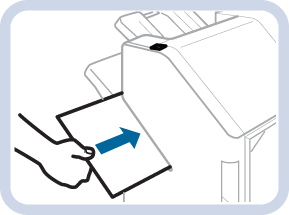 Staple button
 |
|
2 |
Push the staple button to staple the sheets. The staple button starts blinking to indicate that the set of sheets is being stapled. NOTE
You can also wait for the stapler until the staple button starts blinking and the set is being stapled. You can specify the timer in the Settings Editor. Location: |
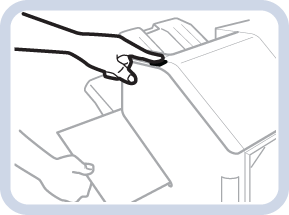 Lower tray
 |
|
3 |
Wait until the green light of staple button turns off and remove the set of stapled sheets. |