
On the [Printers] screen, you can check the details of the printers being monitored and enable/disable notification to the [Events] screen. You can also change the target printers for monitoring.
When you open the [Printers] screen, the following information is displayed for each printer on a printer card.
Printer name
Printer status
Date/time that the printer status was last updated
 NOTE
NOTE
You can click the [ ] icon on the top right of the screen to sort the printer cards in the order of the date/time that the printer status was last updated.
Printer icon
The color of the icon changes according to the operation status of the printer.Viewing the Printer Icons
If the printer icon is red, the printer has an event that has stopped due to an error. For details on the error, check the [Events] screen.
Bell icon
Touch the bell icon to hide or display all the events on the [Events] screen. The display of the [Printers] screen and the smartphone notifications are not affected.
Warning icon
The warning icon is displayed when operator action is required. The displayed icon differs according to the action required and the urgency.Viewing the Warning Icons
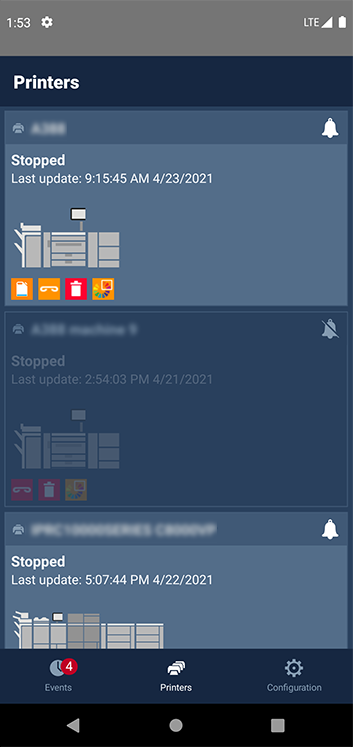 [Printers] screenNOTE
You can touch the printer card to open a pop-up screen displaying an overview of the warning icons.
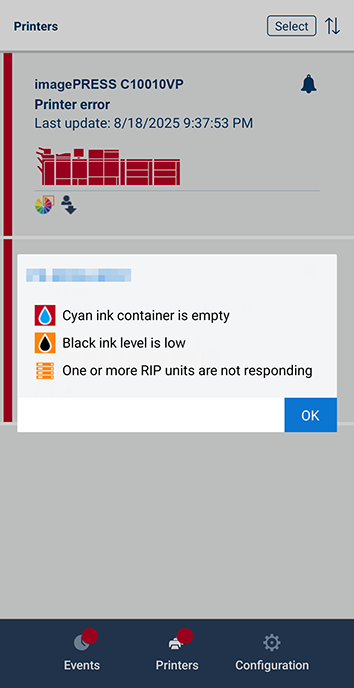 Warning icon overview pop-up screen
You can touch [Select] on the top right of the screen to display the [Select Printers to Display] screen in a pop-up. Deselect the check boxes of printers to remove from the target printers for monitoring with PRISMAremote Monitoring. Select the check boxes of printers to add to the target printers for monitoring with PRISMAremote Monitoring.
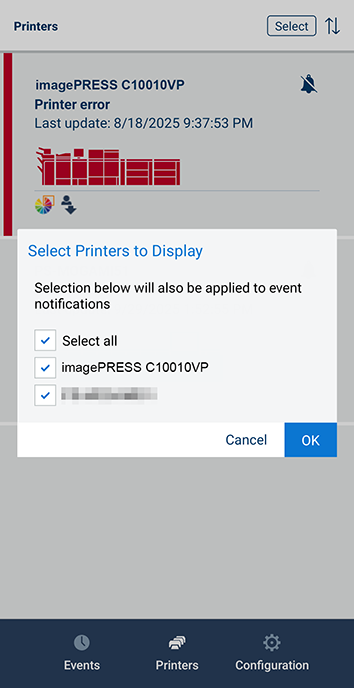 [Select Printers to Display] screenNOTE
The printer cards of printers removed from the target printers for monitoring are no longer displayed on the [Printers] screen.
Notifications regarding printers removed from the target printers for monitoring are no longer delivered to the [Events] screen or the smartphone.