
|
No |
Component |
Description / Function |
|---|---|---|
|
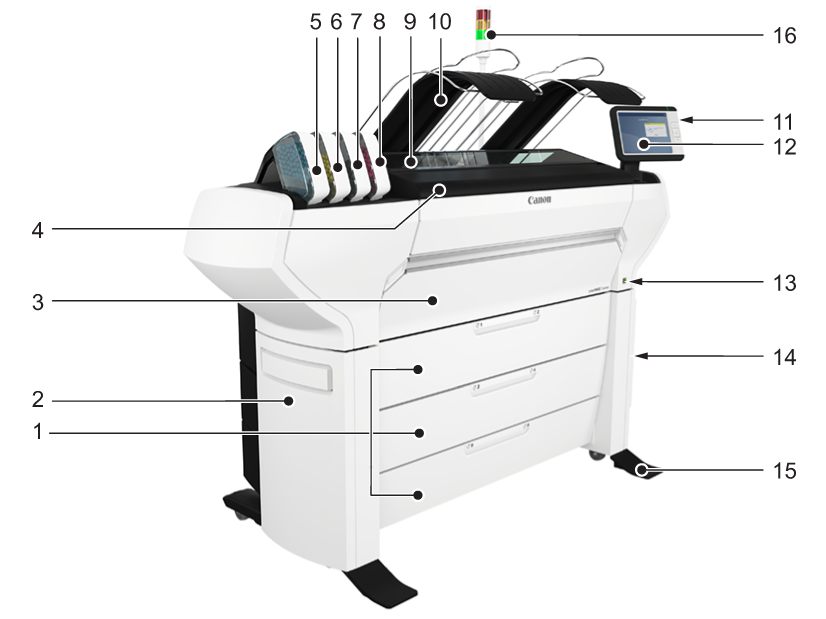
1 |
[media drawers] |
Media drawers with two media rolls. |
|
2 |
[lower left side cover] |
Cover at the bottom left of the device. |
|
3 |
[lower front cover] |
Door to access the media path. |
|
4 |
[top cover] |
Component that covers the top surface of the device. |
|
5 |
[toner cartridge (cyan)] |
Toner cassette for cyan TonerPearls® |
|
6 |
[toner cartridge (yellow)] |
Toner cassette for yellow TonerPearls® |
|
7 |
[toner cartridge (black)] |
Toner cassette for black TonerPearls® |
|
8 |
[toner cartridge (magenta)] |
Toner cassette for magenta TonerPearls® |
|
9 |
[transparent top cover] |
Door to access the print surface / media output section. |
|
10 |
[top delivery tray] |
Delivery tray that collects the printed output. |
|
11 |
[USB port] |
USB connector to use a USB key to print from or to scan to. |
|
12 |
ClearConnect: multi-touch [user panel] |
The ClearConnect user panel allows the user to start copy, scan, or print jobs, and to monitor the system and the job status. |
|
13 |
[on/off button] |
Button to start or shut down the printer. This button is equivalent to the [Shut down] button in WebTools Express. |
|
14 |
[lower right side cover] |
Component that covers the POWERsync+ controller. |
|
15 |
[foot] |
Component at the bottom of the printer, used to lever it. |
|
16 |
[operator attention light] |
Light that gives feedback on the status of the printer |