
The editor is available for [Perfect bound book] and [Booklet] applications.
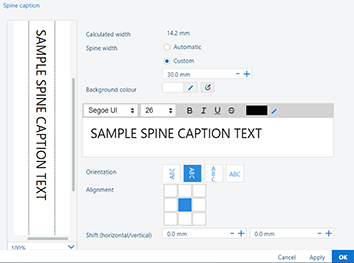
Navigate to .
Select [Perfect bound book] or [Booklet].
Check the setting [Spine caption].
Press [Edit].
Define the parameters of the spine:
[Calculated width]
The width is based on the thickness of the used media.
You can customise the value of the [Spine width]:
[Automatic]
The system uses the calculated value.
[Custom]
You input a different value.
Pick the [Background color] from the dedicated colour picker or from the eyedropper.
Customise the text:
The small WYSIWYG text editor lets you customise the actual text, appearance and colour.
Select the text [Orientation].
Select the text [Alignment].
Input values for [Shift (horizontal/vertical)] to fine tune the exact position.
Press [Apply] to have the preview updated without closing the dialogue or press [Save].