
I want to achieve that messages to and from the external audit server are secured with IPsec. Take this situation:
Auditing messages must be protected with IPsec.
The external audit server uses IPsec and is configured with a pre-shared key.
IPsec is not needed to protect print jobs or to secure administration tasks.
By default, all endpoints bypass IPsec. So there is one rule needed to secure the audit server communication.
 IPsec rules
Configure IPsec.
Go to: .
 [Security] tab
Go to the [Audit logging] options.
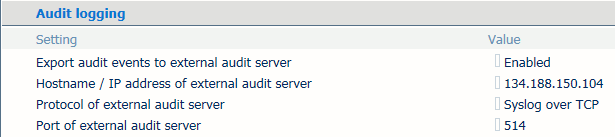 [Audit logging] options
Configure the external audit server.
 Add IPsec rule
Click .
Enter a name in the [Name of rule] field.
Select [Rule applies to specified IP addresses] to create a rule for which you specify the endpoints.
Enter name or address of the audit server in the [Endpoint IP address] text field.
Select [Require IPsec].
Use the [Authentication method] option to select [Pre-shared key].
Enter the pre-shared key in the [Pre-shared key] text field.
Click [OK].