
Before using your printing system, make sure that it is properly installed and that you have read and understand the User Documentation in order to operate the system safely and in accordance with its functional offerings. When using your machine make sure to always comply with the User Documentation.
In order to warn and make aware all persons operating the machine of possible risks, dangers and/or hazards, safety warning labels have been applied where required. For safe operation it is important to understand the meaning of every label. Make sure you read and understand all label descriptions before you start operating the machine.
In order to avoid potential hazards, make sure that preventive and remedial maintenance is executed by skilled persons and/or service technicians only.
Disclaimer:
CANON PRODUCTION PRINTING MAKES NO WARRANTY OF ANY KIND WITH REGARD TO THE CONTENTS OF THIS PUBLICATION, EITHER EXPRESS OR IMPLIED, EXCEPT AS PROVIDED HEREIN, INCLUDING WITHOUT LIMITATION, THEREOF, WARRANTIES AS TO MARKETABILITY, MERCHANTABILITY AND FITNESS FOR A PARTICULAR PURPOSE OF USE OR NON-INFRINGEMENT. CANON PRODUCTION PRINTING SHALL NOT BE LIABLE FOR ANY DIRECT, INCIDENTAL, OR CONSEQUENTIAL DAMAGES OF ANY NATURE, OR LOSSES OR EXPENSES RESULTING FROM THE USE OF THE CONTENTS OF THIS PUBLICATION.
Canon Production Printing reserves the right to revise this publication and to make changes from time to time in the content hereof without obligation to notify any person of such revision or changes.
The websites of the regional Canon sales offices are listed on the cover of the User Documentation. There you can find the addresses of the local Canon sales offices.
Canon Production Printing and its suppliers may collect, combine and use non-personal machine and (individual) user information and data you provide using the machine. Information on what type of information and data is retrieved or received and how access or entry to such information and data by Canon Production Printing and its suppliers is secured please visit Canon Production Printing Terms of Use and Privacy Statement at https://cpp.canon.
In some regions where this product is sold the following product name(s) may be registered as model number(s).
|
Product name |
Model number |
|---|---|
|
Colorado XL Series
|
01094 |
|
02048 |
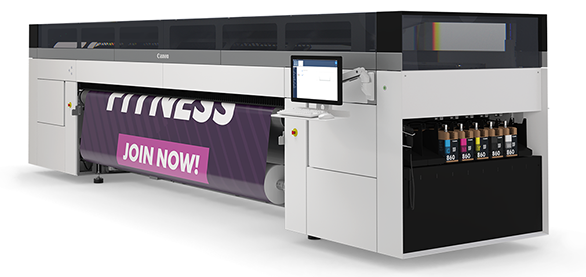
Depending on the context, the terms "product", “printer”, “system”, “machine”, and “equipment” used in the User Documentation mean the printing system for which this User Documentation shall apply.
Some consumables and materials designated to be used by this machine are accompanied with Safety Data Sheets (SDS). Please refer to the corresponding Safety Data Sheets for specific Safety and Environment information and operating instructions.
Product Safety Data Sheets (PSDS) contain physical and chemical related data regarding environmental and safety aspects of the product, as well as references to the acquired safety certificates and environmental labels.
You may download the latest version of Safety Data Sheets and Product Safety Data Sheets from the support site of your product at https://downloads.cpp.canon/.
The machine bears the CE-mark to show conformance with applicable legal EEA-requirements. If applicable, the relevant CE Declaration of Conformity is part of the User Documentation. You may also download it from the support site of your product at https://downloads.cpp.canon/.
The Electrical Circuit Diagram of the complete printing system (only applicable for printing systems designed under the Machinery Directive) shall be provided by Canon Production Printing via the Technical File (external documentation) and is not part of this User Documentation.
Canon Production Printing shall not be liable for damages from:
Failure to comply with the User Documentation;
Work performed incorrectly on the machine;
Unauthorized modifications.
|
Symbol |
Type |
Description |
|---|---|---|

|
WARNING |
Indicates a warning concerning operations that may lead to injury or even death to persons if not performed correctly. To use the machine safely, always pay attention to these warnings. |
|
|
CAUTION |
Indicates a caution concerning operations that may lead to injury to persons if not performed correctly. To use the machine safely, always pay attention to these cautions. |

|
IMPORTANT |
Indicates operational requirements and restrictions. Be sure to read these items carefully to operate the machine correctly, and avoid damage to the machine or property. |

|
PROHIBITED |
Indicates an operation that must not be performed. Read these items carefully, and make sure not to perform the described operations. |

|
NOTE |
Indicates a clarification of an operation, or contains additional explanations for a procedure. Reading these notes is highly recommended. |
|
Symbol |
Type |
Description |
|---|---|---|

|
Mandatory action |
Wear protecting gloves as prescribed in this document when performing a task or action in this area. |

|
Mandatory action |
Read the user instruction manual/user documentation before starting work or before operating equipment or machinery. |
|
Label |
Type |
Description |
|---|---|---|
|
|
WARNING |
Indicates a warning concerning operations that may lead to injury or even death to persons if not performed correctly. To use the machine safely, always pay attention to these warnings. |

|
Warning |
Electricity: Hazardous electrical voltage inside. Do not remove cover. |

|
Caution |
Hot surface: Take care to avoid direct contact with hot surfaces. |

|
Caution |
Sharp element: Take care to avoid injury from sharp elements. |

|
Warning |
Electricity: Protective Earth (PE) terminal which is intended for connection to an external grounded conductor for protection against electric shock in case of a fault. |

|
Warning |
Electricity: Main switch of the equipment. |
Operators
This User Documentation describes safeguards for an operator. Operators include not only users of the equipment, but also all persons who may have access to the equipment or who may be in the vicinity of the equipment. The term operator is used to designate all persons with specific tasks involving the machinery and is not limited to production operators. Operator means the person or persons operating or cleaning machinery.
Roles in customer environment:
System Administrator
Operator
Key Operator
Expert Key Operator
 WARNING
Do not scratch, abrade, heat, twist, bend, or place a heavy object on the power cord or cause any other damage to it. The use of a damaged power cord (e.g. exposed core wire or broken wire) could result in an electrical shock, fire or malfunction of the machine. If the power cord is damaged, immediately switch off the power switch and unplug the power cord from the power outlet. Contact your authorized service representative.
This equipment is not designed for connection to an IT power system. An IT power system is a voltage network in which the neutral wire is not connected to earth.
This is a machine with high leakage current, so earth connection is essential before connecting the mains supply and before operating the machine. It is the responsibility of the customer to provide a suitable building installation (reliable protective earthing connection) in accordance with local legislation.
To disconnect the machine from the mains power, use the main electrical switch see below for location.
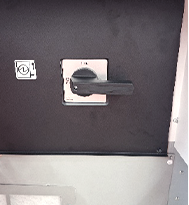
When switching OFF the machine by the main electrical switch, the following part remain energized: Datapath PC, Digital Front-end, Operator panel, Power On-Off Manager and Power supply.
WARNING
The machine may be transported, assembled, installed, moved and repaired only by an authorized service representative.
The installation of accessories and options not permitted for the machines may constitute a violation of the Safety Regulations and Directives, and can also damage the machine.
Consult your authorized service representative for details on which accessories and options are permitted for the machine.
Only use cables specified by the manufacturer.
Place the machine on a horizontally level surface of sufficient support.
Do not place the machine in a location that is subject to vibrations and shocks.
Do not use flammable sprays, liquids or gases near the product as this can cause fire.
This machine is intended to be used in a clean and non-humid operating environment. It is an overvoltage category CAT II system.
Connecting the machine to the mains power system is only allowed for qualified personnel according to local regulations.
Machine connections (cables, hoses, pipes) must be laid in such a way that they do not form any tripping hazards.
WARNING
For keeping the chemical emission below the limits do not place the machine in a room which is too small or insufficiently ventilated. See the Product Safety Data Sheet of the machine for the ventilation recommendations.
 IMPORTANT
Do not obstruct the operating and service clearance areas in any way.
Do not obstruct the cooling ducts, as this can result in overheating or malfunction.
Allow a clearance of ALL sides or more at the back of the machine for ventilation & workplace.
WARNING
Do not lean, lie or stand on any part of the machine, including parts that can be pulled outwards (e.g. media drawers).
Read the User Documentation carefully before operating the machine. In case of any questions or uncertainties regarding the content of this document, contact your authorized sales or service representative.
Before you start to work with the machine, familiarize yourself with the locations and operation of the emergency stop device(s).
Before you start to work with the machine, familiarize yourself with the location and operation of the mains power switch. The mains power switch functions as an emergency stop switch.
Do not work with unprotected long hair or with loosely hanging items of clothing (e.g. ties, sleeves, and scarves) and jewelry such as necklaces, bracelets and rings. These can catch drive mechanisms or moving parts of the machine and cause injury.
Make sure that no objects (e.g. jewelry chains, paper clips, coins) or liquids can get into the interior of the machine. Do not place containers with fluid on top of or near the machine.
Disconnecting the product from the mains-supply network (unplug, power-switch) might result in damage to the system.
Do not open any door when the machine is starting up or running, unless the control panel displays a message that asks you to open one or more doors. This can lead to errors and or machine damage.
Handling heavy media of more than 10 kg has to be done by two persons or with external lifting tools.
CAUTION
This equipment is not suitable for use in locations where children are likely to be present.
IMPORTANT
Do not open any door when the machine is starting up or running, unless the control panel displays a message that you can open one or more doors. This can lead to errors and or machine damage.
WARNING
Do not modify the machine. Modifying the machine can cause a hazard like fire, electrical shock or other injuries or jeopardize given warranties.
Only perform maintenance activities as described in the User Documentation.
Only instructed or skilled persons are allowed to maintain the machine, to avoid any risk and not to jeopardize given warranties.
Do not bridge or disable any safety interlock devices. Disabling or otherwise defeating safety interlock devices will cease their function as safety guard and may create hazardous conditions for all people operating the machine.
Do not use flammable sprays (e.g. canned air), flammable fluids and flammable gasses during maintenance of the machine.
In case of maintenance or error-recovery inside the machine always wear protective gloves, sleeves, glasses and clothing as indicated in the user manual.
CAUTION
Repairs to the machine may only be performed by authorized service representatives.
Service areas may only be opened by authorized service representatives. Do not remove covers and panels that are fixed to the machine. Some parts of the machine may have a hazardous electrical component, hazardous heat source or a laser beam source inside that could cause an electrical shock or other injuries.
CAUTION
Only skilled person(s) are allowed to move the machine.
WARNING
In case smoke and/or fire is noticed:
Immediately try to close in a safe way all machine covers and doors so that the smoke or fire stays within the enclosure of the machine. Prevent personal injury during closing of these doors and covers.
Immediately cut of the electrical power to the machine by disconnecting the mains plug or proper disconnecting device. Make sure that the machine cannot be switched on any more.
Immediately inform the emergency response services.
Poisonous gases can be produced in any fire. They can also result from a fire in this machine.
Keep into account: Canon Production Printing systems are designed in such a way that fire is encapsulated within the enclosure, thus preventing the further spread of fire to the customer’s premises.
In emergency situations, stop the machine immediately using an emergency stop device.
In case of damage to the covers, power cable, operating elements, brushes, output fingers, or in case of penetration of fluids or foreign bodies, disconnect the machine from the power supply and contact your authorized service representative.
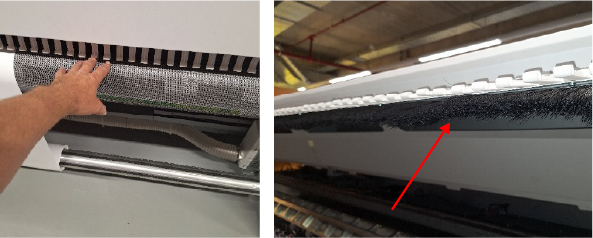
In case of fire of the machine only use a foam spray fire extinguisher.
WARNING
Do not throw ink or ink containing parts or contaminated parts into an open flame.
Do not leave ink or ink containing parts or contaminated parts within reach of children.
Store consumables, supplies and maintenance materials away from any food and drinks.
Be careful when handling fluids. Clean up spilled fluids immediately.
CAUTION
Only use the materials the manufacturer recommends and that are developed for the machine.
Use maintenance materials and other materials for their intended purpose only.
Ink polluted gloves are considered chemical waste and must be disposed according to local regulations.
Dispose of waste of consumables, supplies and maintenance materials and its packaging containing residues according to federal, state and local regulations. Do not rinse empty packaging. Avoid release of ink or toner into the sewage system.
From the point of view of occupational health and safety it is not recommended that people who are sensitive to chemicals (e.g. people with asthma) work with ink or chemicals.
IMPORTANT
The expected lifetime of the complete integrated Safety system is at least 20 years according to Machinery Directive 2006/42/EC.
CAUTION
UV inks can be harmful if not properly handled. Cumulative exposure can lead to sensitization. Always follow the ink related Safety Data Sheets (SDS) guidelines carefully in order to ensure maximum safety.
Avoid skin contact with ink and uncured printed media.
Curing of media of the Canon Production Printing supported media-list is tested and considered sufficient under standard conditions.
After a printer error, wear gloves to handle the unfinished print.
Wear safety glasses with side shields when handling ink or maintenance materials. Always follow the ink related Safety Data Sheets (SDS) guidelines carefully in order to ensure maximum safety.
Wear gloves when contact with ink or maintenance materials is possible. Gloves should always overlap sleeves. Follow the ink related Safety Data Sheets (SDS) guidelines carefully in order to ensure maximum safety.
If a glove, sleeve or apron is contaminated with ink follow the ink related Safety Data Sheets (SDS) guidelines carefully in order to ensure maximum safety.
Do not reuse single-use gloves.
Do not handle prints without gloves if the ink is not properly cured.
Ink polluted gloves and uncured media are considered chemical waste and must be disposed according to local regulations.
If ink contacts your skin: clean immediately with soap and water. Do not use alcohol or other solvents. Seek medical attention/advice if skin irritation or rash occurs.
If ink contacts your eye(s) flush with water, consult the ink related Safety Data Sheet (SDS). Contact a doctor if irritation develops and persists.
Inks are not suitable for food-related or children-related applications.
All waste containing uncured UV ink is hazardous and must be disposed of separately according to local regulations. Do not mix ink waste with non-hazardous waste (household, office, etc.). Do not allow ink waste to reach sewage systems or drinking water supplies. Ink waste includes maintenance pads, cloths, gloves and any other material containing uncured or partly cured UV ink. Dispose Ink waste according to federal, state and local regulations.
Discard the ink bottle or maintenance material bottle if it shows any sign of wear, physical damage (cracking or leaking) or at expiry (date), according to federal, state and local regulations.
CAUTION
UV light emissions are highest at a height of 110 cm above the floor and increase significantly the closer you are to the lamp.
Wear clothing that protects the skin against UV light. Gloves and long-sleeved clothes are essential to reduce skin exposure to UV light.
Avoid direct skin contact with UV lamp unit LED and glass cover. When heated, compounds from the skin can form permanent etching of the surface of the UV lamp unit causing premature failure or reduced print-quality.
IMPORTANT
Accumulation of dust can impair the performance of the equipment, can cause malfunctions, and in rare cases, contribute to hazardous conditions such as overheating or electrical faults. To minimize these risks, users of the equipment must adhere to the prescribed cleaning and maintenance procedures. Ensure that both the equipment and the surrounding area (printing room) are kept clean and free from excessive dust.
WARNING
All parts are produced according to the sustainability policy of Canon Production Printing. You can discard all used parts into a common dustbin, or follow your local or national sustainability and waste disposal procedures.
WARNING
This machine contains static magnetic part(s) where there may be a risk of interference with Active Implanted Medical Devices (AIMD) e.g. cardiac pacemakers. Persons with an AIMD please keep at a safe distance. For more information please contact: Canon Production Printing.
CAUTION
For any information (e.g. requirements) about commissioning, disassembly, recycling, and disposal of CPP machines and/or materials (e.g. packaging waste, supplies, consumables) in your country or state please consult your local Canon NSO, Canon RSHQ and/or dealer.