
The color of a printer icon changes according to the operation status of the printer.
 IMPORTANT
The operation status is not linked with the warning icon. If a warning icon is displayed below a printer icon, check the information of the warning icon and have an operator take action if required.
 NOTE
NOTE
The shape of the icon may differ according to the printer model, but the meaning of each color remains the same.
|
Color of Printer Icon |
Example |
Operation Status |
|---|---|---|
|
Green |

|
The printer is printing normally. |
|
Blue |

|
The printer is waiting for a print job. |
|
Orange |

|
The printer is waiting for the RIP process to complete. When the RIP process is complete, printing will start. |
|
Red |
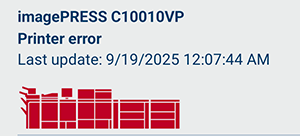
|
An error has occurred in the printer and caused a job to stop. For information on the error, check the [Events] screen. |
|
Gray |

|
The printer is offline. |